

Qatar ID Check, How Can you Track your QID Status
Last updated on July 9th, 2025 at 06:19 pm
To verify the status and validity of your Qatar ID Check (QID), you can utilize the online services provided by Qatar’s Ministry of Interior (MOI). Here’s how:
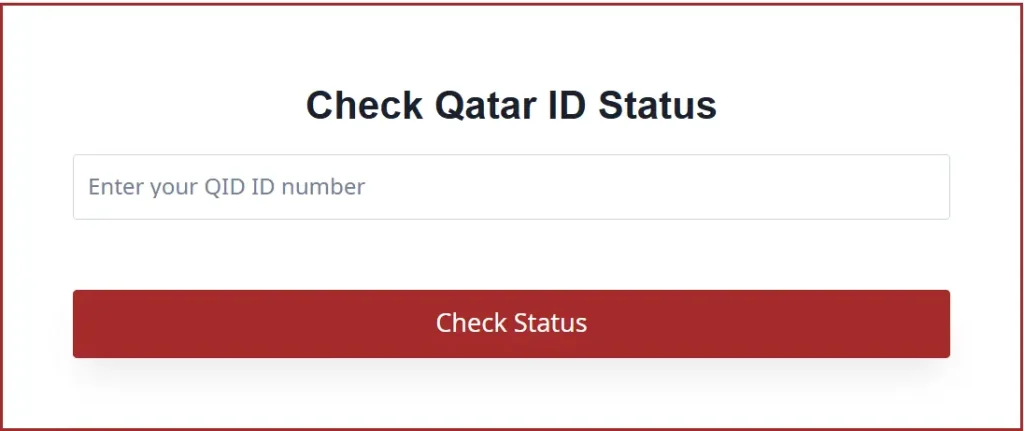
Using the MOI Qatar Online Portal:
- Access the Portal: Navigate to the MOI Qatar ID Check Portal.
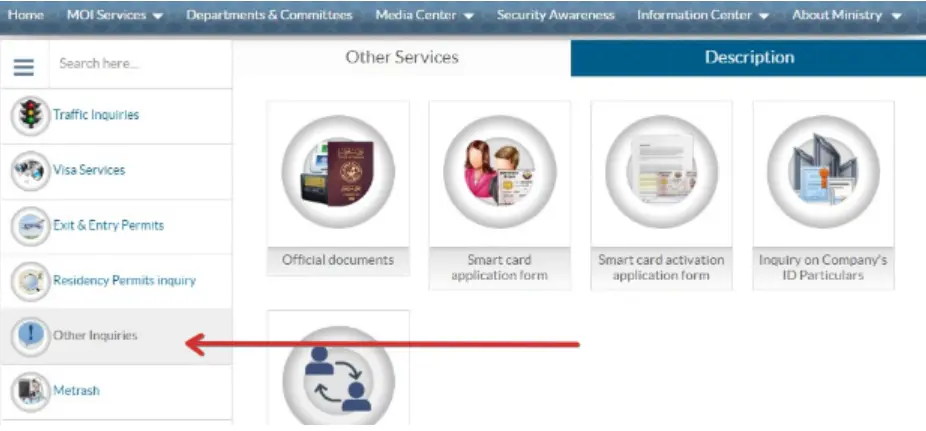
2. Enter Your Details: You can search using either your QID number or passport number:
- For QID Number: Input your 11-digit QID number.
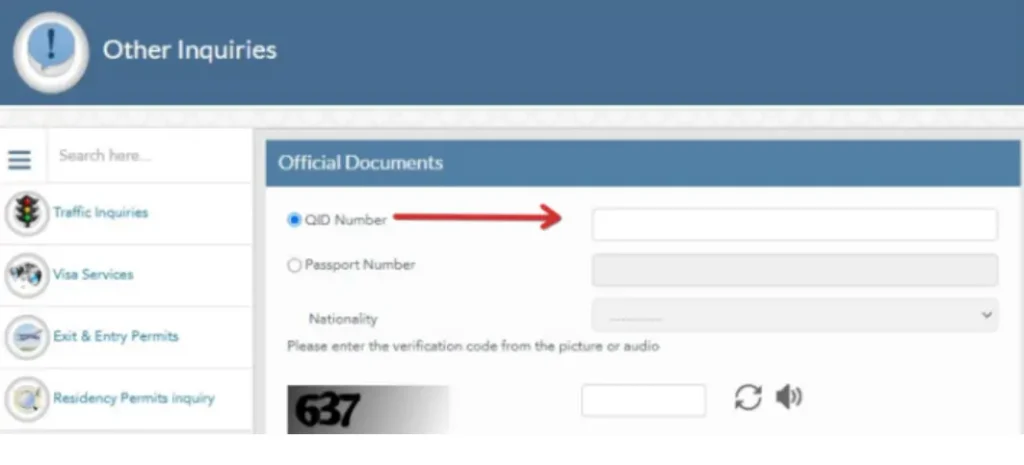
- For Passport Number: Select your nationality from the dropdown menu and enter your passport number
3. Complete Verification: Enter the verification code displayed on the screen to confirm you’re not a robot.
4. Submit: Click the “Search” button to view your QID status and details.
This service provides real-time information about your QID, including its validity and expiration date.
Using the Metrash2 Mobile Application:
The MOI also offers the Metrash2 app, which provides digital access to your Qatar ID and other official documents:
- Download the App: Install the Metrash2 app from your device’s app store.
- Log In: Use your QID number and registered mobile number to log in.
- Access Your ID: Within the app, navigate to the “Wallet” section to view a digital copy of your Qatar ID.
This digital ID is recognized for various services and can be a convenient alternative to carrying the physical card.
For a visual guide on checking your Qatar ID status online, you may find the following video helpful:
Regularly checking your QID status ensures that your residency and official records remain up-to-date, helping you avoid potential issues with expired documentation.
To track your Qatar ID (QID) status, follow these steps:
Online via MOI Qatar Website
- Visit the MOI Portal: MOI Qatar ID Check
- Enter Your QID or Passport Number:
- If using QID, input your 11-digit Qatar ID number.
- If using Passport, select your nationality and enter your passport number.
- Verify Captcha: Enter the verification code displayed on the screen.
- Click “Search” to see your QID status and validity.
Qatar ID Card Check :
To check the status of your Qatar ID Card, follow these simple steps:

Step 1: Access the Ministry of Interior (MOI) Qatar Website
Begin by visiting the official MOI Qatar website. This platform hosts various services, including ID card status checks.
Step 2: Navigate to E-Services
Once on the MOI website, locate the ‘E-Services’ section.
Step 3: Choose the ID Card Status Option
In the E-Services section, look for an option related to the Qatar ID Card, such as ‘ID Card Status‘ or ‘ID Card Services‘.
Step 4: Enter Your ID Card Details
You will be prompted to enter details specific to your Qatar ID Card.
This usually includes the ID number and possibly other personal information for verification.
Step 5: View Your ID Card Status
After entering your details, submit your query. The status of your Qatar ID Card will be displayed, including information such as its validity, renewal dates, and any pending actions required.
Qatar ID Check by Passport Number
Qatar ID Check your (QID) status using your passport number, follow these steps:
Online via MOI Qatar Website
- Visit the MOI Qatar Portal: MOI Qatar ID Check
- Select “Passport Number” as your search option.
- Enter Your Passport Number and choose your Nationality from the dropdown menu.
- Complete the Captcha Verification.
- Click “Search” to view your QID status, validity, and expiration date.
This method helps if you don’t have your Qatar ID number but still need to verify your status.
How to Qatar ID Link with Mobile Number
To link your Qatar ID Check (QID) with your mobile number, follow these steps:
Method 1: Using Metrash2 App
- Download & Open Metrash2 from the Google Play Store or Apple App Store.
- Log in with your QID number and registered mobile number.
- If not registered, select “Register” and follow the steps.
- Enter your new mobile number and confirm the OTP (One-Time Password) sent via SMS.
- Your mobile number will now be linked to your QID.
Method 2: Through Ooredoo or Vodafone Service Centers
- Visit your nearest Ooredoo or Vodafone branch.
- Provide your QID and request to link/update your mobile number.
- The staff will verify your details and update your number.
Method 3: Via MOI Service Centers
- Visit a Ministry of Interior (MOI) service center.
- Submit your QID and request the mobile number linking service.
- Once verified, your number will be linked to your QID.
After linking, your mobile number will be used for government notifications, Metrash2 services, and SMS updates.
Step 4: Fill in the Form
The final step involves filling out the necessary form to link your mobile number to your Qatar ID check You will be required to enter details such as your Qatar ID number, mobile number, and other relevant information. Make sure to enter all details accurately.
Qatar ID Check Renewal
To check the renewal status of your Qatar ID Check (QID) and renew it if necessary, follow these steps:
1. Check Qatar ID Status (Before Renewal)
You can check if your QID is expired or needs renewal using the MOI Qatar portal:
MOI Qatar ID Check
Steps:
- Enter your QID number or passport number.
- Complete the captcha verification.
- Click “Search” to see your QID expiry date.
2. Renew Qatar ID Online (via Metrash2 App)
If your QID is expired or about to expire, renew it through Metrash2:
- Log in to Metrash2 (Download from Google Play or Apple Store).
- Go to “Residency Services” → “Renew Residency”.
- Enter your QID number and choose the renewal period (1-3 years).
- Select your delivery method (self-collection or delivery).
- Make the payment online via credit/debit card.
- Wait for confirmation via SMS.
3. Renew Qatar ID at MOI Service Centers
- Visit an MOI service center with your QID and passport.
- Request QID renewal at the counter.
- Pay the renewal fee (typically QAR 500-1000 depending on your employer/sponsor).
- Collect your new Qatar ID once processed.
4. Check Your Renewed QID Status
- After renewal, check your QID status using the MOI portal.
- If you opted for delivery, your QID will arrive at your registered address.
How to Check Qatar ID Status by Visa Number
- Go to the MOI Qatar Portal:
- MOI Qatar Visa Inquiry
- Select “Visa Inquiry”.
- Enter Your Visa Number and select Nationality.
- Complete the Captcha Verification.
- Click “Submit” to check your QID or visa status.
Fees for Smart QID
In Qatar, residents have the option to upgrade to a Smart Qatar ID Check (QID) card, which offers enhanced security features and facilitates access to various e-government services. The fee for issuing a Smart ID card is QAR 100.
For those interested in utilizing the e-gate services at Hamad International Airport, additional fees apply based on the desired subscription period:
- 1-year subscription: QAR 100
- 2-year subscription: QAR 150
- 3-year subscription: QAR 200
These e-gate services allow expedited passage through airport immigration, making travel more convenient.
To obtain or upgrade to a Smart QID card, residents can visit the Ministry of Interior (MOI) service centers or apply through the Metrash2 mobile application. It’s advisable to check the latest guidelines and fees on the official MOI website or authorized channels, as policies may have been updated since previous reports.
Why is it Important to Check your Qatar ID Status?
Checking your Qatar ID Check (QID) status is essential for several reasons, as it serves as your primary identification and residency document in Qatar. Keeping your QID active and updated ensures that you can legally reside, work, and access various services in the country.
- Legal Compliance – A valid QID is required to avoid fines, legal issues, or residency violations. If your QID expires, you may face penalties or restrictions on government services.
- Employment & Business – Employers need an active QID to process salaries, apply for work permits, and sponsor family members. Businesses also require a valid QID for transactions.
- Access to Government Services – Your QID is necessary for services like healthcare (Hamad Medical Corporation), banking, renewing a driver’s license, and vehicle registration.
- Travel & Residency Renewal – A valid QID is required for re-entry to Qatar if you travel abroad. Checking your status helps in timely renewal to avoid travel restrictions.
- Metrash2 & Online Transactions – Many government services, including visa renewals, fines, and official document requests, require a valid QID.
- Avoid Service Disruptions – Many essential services, such as mobile SIM cards, bank accounts, and internet services, are linked to your QID. An expired ID can lead to service suspensions.
By regularly checking your QID status through the MOI Qatar portal or Metrash2 app, you can ensure a hassle-free stay in Qatar.
What are Qatari ID Numbers?
Qatari ID Numbers (QID Numbers) are unique 11-digit identification numbers assigned to all residents and citizens of Qatar. These numbers are issued by the Ministry of Interior (MOI) and serve as an essential identifier for official, legal, and governmental purposes.
Structure of a Qatari ID Number
A QID number follows a specific format: YYYY NNNNNNN
- YYYY (First 4 digits): Represents the birth year of the cardholder.
- N (5th digit): Indicates the category (e.g., 2 for expatriate males, 3 for expatriate females, 0 or 1 for Qatari citizens).
- NNNNNNN (Last 7 digits): A unique serial number assigned to the individual.
Purpose of a QID Number
A QID number is required for:
1. Residency and employment verification
2. Opening bank accounts and financial transactions
3. Healthcare access (Hamad Medical Corporation, insurance, etc.)
4. Driving license and vehicle registration
5. SIM card registration (Ooredoo, Vodafone, etc.)
6. Government services (Metrash2, Hukoomi portal, visa applications, etc.)
7. Traveling and immigration procedures
How to Find Your QID Number
- Printed on your Qatar ID card (front side).
- Check online via MOI Qatar ID Inquiry.
A valid QID number is essential for legal residency in Qatar. Always ensure your QID is up-to-date and renewed on time to avoid any issues!
How Long Does a Qatar ID Take?
The processing time for a Qatar ID Check (QID) depends on whether it is a new QID, renewal, or replacement. Here’s a general timeline:
1. New Qatar ID (For First-Time Applicants)
- Once a work visa or family residence permit is approved, the QID is issued within 1 to 3 working days after completing the necessary medical tests and fingerprint registration.
- In some cases, processing may take up to 7-10 days, depending on MOI workload or delays in document verification.
2. Qatar ID Renewal
- Online via Metrash2: Instant processing, and the renewed QID is ready within 24 hours.
- At MOI Service Centers: If done manually, the process usually takes 1 to 2 working days.
- Home/Office Delivery: If selected, it may take 3-5 working days for the QID card to be delivered.
3. Lost or Damaged Qatar ID Replacement
- Application and payment via Metrash2 or MOI center can be done the same day.
- The replacement QID is issued within 24-48 hours.
4. Processing Delays
- Delays may occur due to pending visa approvals, incomplete medical/fingerprint registration, or holidays.
- You can track the QID status using the MOI Qatar ID Inquiry Portal
Conclusion on Qatar ID Check :
Regularly checking your Qatar ID Check (QID) status is essential for ensuring legal residency, accessing government services, and avoiding penalties. Whether verifying QID validity, renewal status, or linking it to a mobile number, the MOI Qatar online portal and Metrash2 app provide quick and convenient options. Additionally, using a QID number, passport number, or visa number, individuals can track their Qatar ID status and ensure smooth transactions in banking, healthcare, travel, and employment. Always keep your Qatar ID updated to prevent any disruptions in daily activities in Qatar.
FAQS ” Frequently Asked Questions ” about Qatar ID Check:
1. What is a Qatar ID (QID)?
A Qatar ID Check is an official identification card issued by the State of Qatar to its citizens and expatriates. It serves as legal proof of identity and residency within the country and is required for accessing various services such as opening bank accounts, obtaining a driving license, and utilizing government services.
2. How can I check the status or validity of my Qatar ID?
You can check the status or validity of your Qatar ID Check through the Ministry of Interior (MOI) Qatar’s online portal or via the Metrash2 mobile application.
- Using the MOI Online Portal:
- Visit the MOI Qatar ID Check Portal.
- Enter your QID number or passport number.
- If using your passport number, select your nationality from the drop-down menu.
- Complete the captcha verification.
- Click the “Search” button to view your ID status.
- Using the Metrash2 App:
- Download and install the Metrash2 app from your device’s app store.
- Log in using your QID number and PIN.
- Navigate to the “Wallet” section.
- Select “Qatar ID” to view your ID details and status.
3. What should I do if my Qatar ID is lost or damaged?
In case of a lost or damaged Qatar ID:
- Inside Qatar:
- Report the loss or damage immediately to the authorities.
- Apply for a replacement through the Metrash2 app or by visiting an MOI service center.
- A fee of QR 200 is applicable for replacement.
- Outside Qatar:
- Contact your sponsor in Qatar to apply for a return permit on your behalf.
- Upon returning to Qatar, apply for a replacement ID as mentioned above.
4. How can I renew my Qatar ID Check?
The renewal process for a Qatar ID Check depends on your residency status:
- For Residents:
- Your sponsor (employer or family member) must initiate the renewal process.
- Renewal can be done online via the MOI e-services portal or the Metrash2 app.
- Required documents typically include a valid passport, existing QID, and any other documents specified by the MOI.
- Fees vary depending on the duration of renewal and the sponsor type.
- For Citizens:
- Renewal can be done online or by visiting an MOI service center.
- Ensure all personal information is up-to-date during the renewal process.
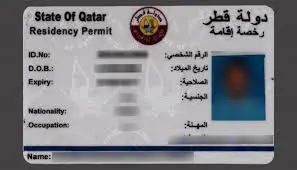
5. What information is contained on the Qatar ID card?
A Qatar ID card includes:
- Holder’s photograph
- Full name
- QID number (11-digit unique identification number)
- Date of birth
- Nationality
- Signature
- For expatriates: occupation, employer details, and passport information
6. Is it mandatory to carry my Qatar ID Check at all times?
Yes, residents and citizens of Qatar are required to carry their Qatar ID Check at all times and present it upon request by authorities.
7. Can I use my Qatar ID for travel?
The Qatar ID Check is primarily for identification within Qatar. For international travel, a valid passport is required. However, the Qatar ID may facilitate travel within Gulf Cooperation Council (GCC) countries, but it’s essential to check the specific entry requirements of each country before traveling.
8. What is a Smart Qatar ID card, and what are its benefits?
A Smart Qatar ID card contains an embedded electronic chip that stores digital data, enhancing security and enabling access to various e-government services. Benefits include:
- Secure authentication for online transactions
- Access to e-government services
- Facilitated travel within GCC countries (subject to specific country regulations)
9. How can I update my personal information on my Qatar ID?
To update personal information such as your address, employer details, or passport information:
- Visit an MOI service center with the necessary supporting documents.
- Some updates may be possible through the Metrash2 app, depending on the nature of the change.
- Ensure that all changes are reported promptly to avoid any legal complications.
10. What are the fees associated with the Qatar ID?
Fees for the Qatar ID Check may vary based on the service required:
- New Application: Approximately QR 100
- Renewal: Fees vary depending on the duration and sponsor type.
- Replacement of Lost/Damaged ID: Approximately QR 200


